Python: Pandas Intro (Dataframes)

Before we continue onto Dataframes, I want to clear up something from the Series exercise. Note the line (from pandas import Series, DataFrame)

pandas1

Using that line, I can call upon Series or DataFrame directly in my code

pandas2

In this example below, I did not directly import the methods Series and DataFrame, so I when I tried x = Series() I go an error.

I had to use the full method name of pd.Series() for this to work.

pdDF

DataFrame

DataFrames provide another level of data management for Python. Those of you who come from a more data driven background with appreciate DataFrames.

Let’s start by creating dictionary.

pdDF1.jpg

Now, pass the dictionary to the method DataFrame()

Note, now you have a table looking structure with named columns

pdDF2

You can call up a list of indexes or columns using the methods below:

pdDF3.jpg

DataFrame.info() will return a summary of your DataFrame

pdDF4

Head and Tail

Create a new DataFrame from a dictionary

pdDF5.jpg

If you want just see a few of the first elements, you can use the head() method

pdDF6

The tail() method does the last few. You can even choose how many rows you want.

pdDF7

Describe

The describe() method gives you some quick statistics on any numeric column

pdDF8.jpg

Slice

You can slice a DataFrame just as you would a list

pdDF9

Choose What to Display

DataFrames allow you to filter what rows to display by value or column

pdDF10

There is a lot more you can do with Series and DataFrame in pandas, and we will be covering them in later lessons. For now though, I think you have a general idea.


If you enjoyed this lesson, click LIKE below, or even better, leave me a COMMENT. 

Last Lesson: Pandas Series

Next Lesson: Working with DataFrames

Return to: Python for Data Science Course

Follow this link for more Python content: Python


Python: Pandas Intro (Series)

Pandas adds some great data management functionality to Python. Pandas allows you to create series and dataframes.

Series

Think of a series as combination of a list and a dictionary.

To use pandas, first we need to import it.

pandas1

To create as series with pandas, use the following syntax

  • variable = Series([item1, item2, … item_n])

** note Series is capitalized. This method is case sensitive

pandas Series can contain numbers or strings. You call elements in a Series like you do a list. variable[index]

pandas2

You can create you own index in a Series as well, making it function a lot like a dictionary.

Notice with the syntax leg[leg==4] I am able to filter by items equal to 4

pandas3

If you have an existing dictionary, you can convert it into a pandas Series

pandas4

You can call the index and values of a Series using the following methods:

pandas5


If you enjoyed this lesson, click LIKE below, or even better, leave me a COMMENT. 

Last Lesson: Numpy Part II

Next Lesson: Pandas DataFrames

Return to: Python for Data Science Course

Follow this link for more Python content: Python


Python: **Kwargs and *Args

Outside of beings incredibly fun to say, Kwargs and Args can be pretty useful.

Here is how they work. Let us say you wanted to make a function that adds 4 numbers:

Notice what happens when we only provide 3 arguments, we error out. The same thing happens if we try to give the function 5 arguments.

pythonkwa

Well, if the world perfectly predictable, this wouldn’t be an issue. But in the real world, making a function that adds 4 and only 4 numbers isn’t very useful. A function that can add any given set of numbers however is very useful.

*args

*args to the rescue

Using the keyword *args inside the function parenthesis gives you the flexibility of having as many, or as few arguments as you want.

pythonkwa1.jpg

Try your code in our online Python console:  

**kwargs

Kwargs are basically args with keywords. Think dictionaries.

pythonkwa2

You can combine regular arguments with *args and **kwargs

Try your code in our online Python console:  


If you enjoyed this lesson, click LIKE below, or even better, leave me a COMMENT. 

Last lesson: Regular expressions

Back to Python Course: Course


Python zip and unpack

zip

Zip is a quick way to take multiple lists can combine them.

unpacking

To reverse the effect, turn a list of tuples into separate lists, use * in the parenthesis: zip(*x)

Try your code in our online Python console:  

If you enjoyed this lesson, click LIKE below, or even better, leave me a COMMENT. 

Last Lesson: lambda, map, reduce, filter

Next Lesson: list comprehension

Back to Python Course: Course


Python: Regular Expressions

Regular Expressions are used to parse text. In the world of Big Data, being able to work with unstructured text is a big advantage.

To use regular expressions, first you must import the module. This is done by placing the command import re at the top of your code.

re.search()

Now, let us examine this code below:

We want to see if dog (assigned to x) is in the sentence ‘I just a saw dog. He was chasing a cat.'(assigned to y)

Using the search() method from re, we ask if re.search(x,y). Note you place the item you are searching by first in the parenthesis. re.search() returns a boolean value (True, False).

You can use re.search with lists of search items as well.

Here z is taking one item from the list x at a time and running it through re.search. Notice ‘one’ returns True, while ‘two’ returns false.

Try your code in our online Python console:  

re.findall()

re.findall returns all instances of your search term. Notice it found water whether it was a stand alone word, or part of a larger word.

pythonreg2.jpg

re.split()

The re.split() method does pretty much what you would think it does. You can pick a delimiter and the method will split your string at that delimiter.

In the example below, ‘;‘ is my delimiter. Notice how it split my string in two, plus removed the delimiter for me.

pythonreg3

Try your code in our online Python console:  

use re.search() to find position

You can use re.search() to find the starting and ending position of a search item in a string

pythonreg4

exclusion

If you want to exclude characters, use the ^ between square brackets [].

This example excludes the letter s = [^s] and puts the remaining characters in a list

In the second example, I add + after the []. This keeps all the characters together.

pythonreg5.jpg

This next example is a useful tool you will find yourself using in text mining. Here we use [^?!. ]+ to remove punctuation.

pythonreg6

Try your code in our online Python console:  


If you enjoyed this lesson, click LIKE below, or even better, leave me a COMMENT. 

Last Lesson: Generators

Next Lesson: kwargs and args

Back to Python Course: Course


Python: Enumerate() and Sort

Enumerate

Enumerate is a useful function in Python as it returns both the indexes and values of Lists.

Let’s look at the code:

Running the list through a For loop, we assign the index to x and the value to y


Let’s say we only wanted to print every other value in a list

To do that, I could run a simple nested an IF statement inside my loop stating if the index an even number, then print the value. (x%2==0 is an easy trick for finding even or odd values. % means modulus – it returns the remainder of a division problem. Any even number divided by 2 will not have a remainder – so the modulus will be 0)

Try your code in our online Python console:  

Sort

Python lists come with a two built in sort functions.

sorted()

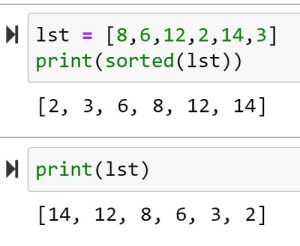
The first: sorted() – sorts the items in a list, but does not alter the list.

As you can see, sorted(lst) returns a sorted list, but calling lst again shows the list is still in its original order.

To sort the items in descending order use the reverse=True command:

list.sort()

list.sort() is a method – meaning it is a function found with the class List.

list.sort() sorts items in a list and alters position of the items in the actual list. So the next time you run the list, the items are sorted in the list.

Also note that reverse = True works in the list.sort() method as well.

Try your code in our online Python console:  


If you enjoyed this lesson, click LIKE below, or even better, leave me a COMMENT. 

Last Lesson: Functions

Next Lesson: Error Handling

Back to Python Course: Course

Python: Generators

I apologize in advanced as this topic is going to get a little computer sciency. Unfortunately there is no way around it. At first look, generators are going to resemble all the other iterables we have covered so far. But unlike loops we have used so far, generators produce iterables “lazily”.

So what do I mean by “lazily”?

Let’s consider this infinite loop I created below. This will run forever, producing a List (at least until your computer’s memory runs out). And that is the issue. Eventually the computer will run out of memory.

pythonGen

**note if you actually decide to run the code above, you will need to force it to stop. Just closing the notebook won’t do it. Go to File>Close and Halt to stop this loop from running and eventually crashing your PC.

pythonGen1

This becomes are consideration when working with large data sets. The more memory you chew up, the worse you performance. So a work around is to use generators. Generators produce the data lazily, meaning they produce the iterator, yield it, and then forget it – they don’t put the values into a List like regular iterators do. They only yield one iterator at a time.

Notice my continued use of the world yield? There is a reason for that. Look at the code for a generator below:

Note that generators have to be functions. The yield command – which signifies a generator,  cannot be used outside of a function.

pythonGen2.jpg

Try your code in our online Python console:  

Now, I know this looks like I am actually repeating work here. I mean I am using two loops to do what I could do with one loop. This issue arises when we have large numbers. If you are only iterating a few hundred numbers, you probably don’t need to worry about generators. However, if you are going to be iterating 100,000 elements, you will see some major performance improvements by using the code above.


If you enjoyed this lesson, click LIKE below, or even better, leave me a COMMENT. 

Last lesson: list comprehension

Next Lesson: regular expressions

Back to Python Course: Course

Python: Tuples and Sets

Tuples

Tuples are a grouping of data in Python similar to a list, except tuples are immutable, meaning you cannot add or delete items from the tuple.

Tuples are created using  () instead of []. A tuple with a single value still requires a comma though. x = (1,)

pythontuple

Notice attempting to delete an element from the tuple results in an error.

Try your code in our online Python console:  

Set

Sets are another method of hold data collections, but they have some interesting factors other methods do not. Sets are very useful as they only return unique elements for the data they store.

pythontuple2.jpg

Looking at the example below, notice how the second set has 4 elements, but the output is only 3. This is due to the fact that sets only return unique values.

You create a set using set() like above, or you can just use {}

pythontuple1.jpg


Try your code in our online Python console:  

If you enjoyed this lesson, click LIKE below, or even better, leave me a COMMENT. 

Last Lesson:  Working with dictionaries

Next Lesson: Conditional Logic

Back to Python Course: Course

Python: Working with Lists

Making a list in Python is simple: x = [1,2,3,4]

Now let us see how we can work with them.

Index

First thing to understand is that a list is indexed. Each item in the list is given a number that tells you its position in the list.

It is important to note that Python is a 0 index language. This means indexes begin at 0 not 1. So the first item in the list, is found by calling: x[0]

pythonlist

Note that x[4] returns an error. Since there are 4 items in the list, the indexes go 0,1,2,3. Index 4 is out of range.

Another interesting point to understand about indexes is that you can use a negative index. x[-2]  returns Duck

Try your code in our online Python console: 

Index Range

Use a “:” to return a range of items from a list: x[start:end]. If you leave out the start or end number, the index starts or ends at the start or end of the list

pythonlist1

Update Values in a List

If you want to change a value in a list, just assign it a new value like you would with a regular variable.

pythonlist2

Append()

If you want to add an item to then end of a list, you can use the Append() function

pythonlist3.jpg

Del

To delete a item from a list, use the Del command.

pythonlist4

Remove()

Remove works like Del, except instead of using index values, Remove() uses the values stored in the list.

pythonlist5.jpg

Try your code in our online Python console: 

Pop() and Insert()

Pop() simply returns the last item from a list

Insert() lets you add a item to a list, but it also lets you choose what position in the list to add it.

pythonlist6.jpg

Len()

Len() returns a count of the number of items in a list.

pythonlist7.jpg


Try your code in our online Python console: 

If you enjoyed this lesson, click LIKE below, or even better, leave me a COMMENT. 

Last Lesson: Python Lists and Dictionaries

Next Lesson: Working with Dictionaries

Back to Python Course: Course

Python: Intro to Graphs

Visualizations are big part of analytics. You will need to produce visually engaging graphics for presentations, reports, and dashboards. You will also make graphs for your own use in data discovery and analysis. As bonus, unlike data cleaning, data viz can be pretty fun.

Matplotlab and Pyplot

Matplotlab is a module you can import into Python that will help you to build some basic graphs and charts. Pyplot is part of Matplotlab and the part we will be using in the following example.

**If you are using the Anaconda Python distribution, Matplotlab is already installed. If not, you may need to download it from another source.

Line Graph

Syntax

  • %matplotlib inline – this code allows you to view your graphs inside jupyter notebooks
  • from matplotlib import pyplot as plt – here we import pyplot from matplotlib into our program (note, we only want pyplot not all the functions in matplotlib).Adding “as plt” gives us a shorter alias to work with
  • age and height lines – fill our lists with age and height information for an individual
  • plt.plot(age, height, color = ‘blue’) – here we tell Python to plot age against height and to color our line blue
  • plt.show() – prints out our graph

pythonGraphs

Bar Chart

For this example, we will make a bar charting showing ages of 4 people.

Syntax

  • You should understand the first few lines from the first example
  • count_names = [i for i,_ in enumerate(name)]  – since the name list is a list of strings, we cannot really graph that onto a chart. We need a way to convert these strings into numbers.

Wait? What does for i,_ mean? Let’s jump to the next code sample

pythonGraphs1

While you don’t see it when making the list, a Python list is technically a list of tuples (index number, element). So if instead of i,_ we asked for both elements in the tuple, (i,j) we would get the following.

pythonGraphs2

So by iterating by for i,_ we only return the first element in the tuple (the index)

** notice we are using a list comprehension. If you are unfamiliar with list comprehensions, check out my earlier post: Python: List Comprehension

Let’s clean up our bar chart a little now.

  • plt.ylabel(‘Age’) – label the y-axis Age
  • plt.title(‘Age of People’) – give the graph a title
  • plt.xticks([i+0.5 for i,_ in enumerate(name)], name) – this label function is using a list comprehension to first chose the position on the X-axis, and name provides the person’s name for the label.

pythonGraphs3.jpg


If you enjoyed this lesson, click LIKE below, or even better, leave me a COMMENT

Follow this link for more Python content: Python