Python: Regular Expressions

Regular Expressions are used to parse text. In the world of Big Data, being able to work with unstructured text is a big advantage.

To use regular expressions, first you must import the module. This is done by placing the command import re at the top of your code.

re.search()

Now, let us examine this code below:

We want to see if dog (assigned to x) is in the sentence ‘I just a saw dog. He was chasing a cat.'(assigned to y)

Using the search() method from re, we ask if re.search(x,y). Note you place the item you are searching by first in the parenthesis. re.search() returns a boolean value (True, False).

You can use re.search with lists of search items as well.

Here z is taking one item from the list x at a time and running it through re.search. Notice ‘one’ returns True, while ‘two’ returns false.

Try your code in our online Python console:  

re.findall()

re.findall returns all instances of your search term. Notice it found water whether it was a stand alone word, or part of a larger word.

pythonreg2.jpg

re.split()

The re.split() method does pretty much what you would think it does. You can pick a delimiter and the method will split your string at that delimiter.

In the example below, ‘;‘ is my delimiter. Notice how it split my string in two, plus removed the delimiter for me.

pythonreg3

Try your code in our online Python console:  

use re.search() to find position

You can use re.search() to find the starting and ending position of a search item in a string

pythonreg4

exclusion

If you want to exclude characters, use the ^ between square brackets [].

This example excludes the letter s = [^s] and puts the remaining characters in a list

In the second example, I add + after the []. This keeps all the characters together.

pythonreg5.jpg

This next example is a useful tool you will find yourself using in text mining. Here we use [^?!. ]+ to remove punctuation.

pythonreg6

Try your code in our online Python console:  


If you enjoyed this lesson, click LIKE below, or even better, leave me a COMMENT. 

Last Lesson: Generators

Next Lesson: kwargs and args

Back to Python Course: Course


Python: Enumerate() and Sort

Enumerate

Enumerate is a useful function in Python as it returns both the indexes and values of Lists.

Let’s look at the code:

Running the list through a For loop, we assign the index to x and the value to y


Let’s say we only wanted to print every other value in a list

To do that, I could run a simple nested an IF statement inside my loop stating if the index an even number, then print the value. (x%2==0 is an easy trick for finding even or odd values. % means modulus – it returns the remainder of a division problem. Any even number divided by 2 will not have a remainder – so the modulus will be 0)

Try your code in our online Python console:  

Sort

Python lists come with a two built in sort functions.

sorted()

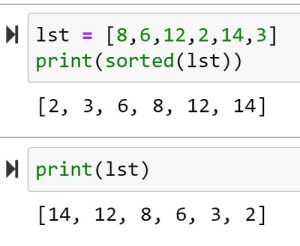
The first: sorted() – sorts the items in a list, but does not alter the list.

As you can see, sorted(lst) returns a sorted list, but calling lst again shows the list is still in its original order.

To sort the items in descending order use the reverse=True command:

list.sort()

list.sort() is a method – meaning it is a function found with the class List.

list.sort() sorts items in a list and alters position of the items in the actual list. So the next time you run the list, the items are sorted in the list.

Also note that reverse = True works in the list.sort() method as well.

Try your code in our online Python console:  


If you enjoyed this lesson, click LIKE below, or even better, leave me a COMMENT. 

Last Lesson: Functions

Next Lesson: Error Handling

Back to Python Course: Course

Python: Generators

I apologize in advanced as this topic is going to get a little computer sciency. Unfortunately there is no way around it. At first look, generators are going to resemble all the other iterables we have covered so far. But unlike loops we have used so far, generators produce iterables “lazily”.

So what do I mean by “lazily”?

Let’s consider this infinite loop I created below. This will run forever, producing a List (at least until your computer’s memory runs out). And that is the issue. Eventually the computer will run out of memory.

pythonGen

**note if you actually decide to run the code above, you will need to force it to stop. Just closing the notebook won’t do it. Go to File>Close and Halt to stop this loop from running and eventually crashing your PC.

pythonGen1

This becomes are consideration when working with large data sets. The more memory you chew up, the worse you performance. So a work around is to use generators. Generators produce the data lazily, meaning they produce the iterator, yield it, and then forget it – they don’t put the values into a List like regular iterators do. They only yield one iterator at a time.

Notice my continued use of the world yield? There is a reason for that. Look at the code for a generator below:

Note that generators have to be functions. The yield command – which signifies a generator,  cannot be used outside of a function.

pythonGen2.jpg

Try your code in our online Python console:  

Now, I know this looks like I am actually repeating work here. I mean I am using two loops to do what I could do with one loop. This issue arises when we have large numbers. If you are only iterating a few hundred numbers, you probably don’t need to worry about generators. However, if you are going to be iterating 100,000 elements, you will see some major performance improvements by using the code above.


If you enjoyed this lesson, click LIKE below, or even better, leave me a COMMENT. 

Last lesson: list comprehension

Next Lesson: regular expressions

Back to Python Course: Course

Python: Tuples and Sets

Tuples

Tuples are a grouping of data in Python similar to a list, except tuples are immutable, meaning you cannot add or delete items from the tuple.

Tuples are created using  () instead of []. A tuple with a single value still requires a comma though. x = (1,)

pythontuple

Notice attempting to delete an element from the tuple results in an error.

Try your code in our online Python console:  

Set

Sets are another method of hold data collections, but they have some interesting factors other methods do not. Sets are very useful as they only return unique elements for the data they store.

pythontuple2.jpg

Looking at the example below, notice how the second set has 4 elements, but the output is only 3. This is due to the fact that sets only return unique values.

You create a set using set() like above, or you can just use {}

pythontuple1.jpg


Try your code in our online Python console:  

If you enjoyed this lesson, click LIKE below, or even better, leave me a COMMENT. 

Last Lesson:  Working with dictionaries

Next Lesson: Conditional Logic

Back to Python Course: Course

Python: Working with Lists

Making a list in Python is simple: x = [1,2,3,4]

Now let us see how we can work with them.

Index

First thing to understand is that a list is indexed. Each item in the list is given a number that tells you its position in the list.

It is important to note that Python is a 0 index language. This means indexes begin at 0 not 1. So the first item in the list, is found by calling: x[0]

pythonlist

Note that x[4] returns an error. Since there are 4 items in the list, the indexes go 0,1,2,3. Index 4 is out of range.

Another interesting point to understand about indexes is that you can use a negative index. x[-2]  returns Duck

Try your code in our online Python console: 

Index Range

Use a “:” to return a range of items from a list: x[start:end]. If you leave out the start or end number, the index starts or ends at the start or end of the list

pythonlist1

Update Values in a List

If you want to change a value in a list, just assign it a new value like you would with a regular variable.

pythonlist2

Append()

If you want to add an item to then end of a list, you can use the Append() function

pythonlist3.jpg

Del

To delete a item from a list, use the Del command.

pythonlist4

Remove()

Remove works like Del, except instead of using index values, Remove() uses the values stored in the list.

pythonlist5.jpg

Try your code in our online Python console: 

Pop() and Insert()

Pop() simply returns the last item from a list

Insert() lets you add a item to a list, but it also lets you choose what position in the list to add it.

pythonlist6.jpg

Len()

Len() returns a count of the number of items in a list.

pythonlist7.jpg


Try your code in our online Python console: 

If you enjoyed this lesson, click LIKE below, or even better, leave me a COMMENT. 

Last Lesson: Python Lists and Dictionaries

Next Lesson: Working with Dictionaries

Back to Python Course: Course

Python: Intro to Graphs

Visualizations are big part of analytics. You will need to produce visually engaging graphics for presentations, reports, and dashboards. You will also make graphs for your own use in data discovery and analysis. As bonus, unlike data cleaning, data viz can be pretty fun.

Matplotlab and Pyplot

Matplotlab is a module you can import into Python that will help you to build some basic graphs and charts. Pyplot is part of Matplotlab and the part we will be using in the following example.

**If you are using the Anaconda Python distribution, Matplotlab is already installed. If not, you may need to download it from another source.

Line Graph

Syntax

  • %matplotlib inline – this code allows you to view your graphs inside jupyter notebooks
  • from matplotlib import pyplot as plt – here we import pyplot from matplotlib into our program (note, we only want pyplot not all the functions in matplotlib).Adding “as plt” gives us a shorter alias to work with
  • age and height lines – fill our lists with age and height information for an individual
  • plt.plot(age, height, color = ‘blue’) – here we tell Python to plot age against height and to color our line blue
  • plt.show() – prints out our graph

pythonGraphs

Bar Chart

For this example, we will make a bar charting showing ages of 4 people.

Syntax

  • You should understand the first few lines from the first example
  • count_names = [i for i,_ in enumerate(name)]  – since the name list is a list of strings, we cannot really graph that onto a chart. We need a way to convert these strings into numbers.

Wait? What does for i,_ mean? Let’s jump to the next code sample

pythonGraphs1

While you don’t see it when making the list, a Python list is technically a list of tuples (index number, element). So if instead of i,_ we asked for both elements in the tuple, (i,j) we would get the following.

pythonGraphs2

So by iterating by for i,_ we only return the first element in the tuple (the index)

** notice we are using a list comprehension. If you are unfamiliar with list comprehensions, check out my earlier post: Python: List Comprehension

Let’s clean up our bar chart a little now.

  • plt.ylabel(‘Age’) – label the y-axis Age
  • plt.title(‘Age of People’) – give the graph a title
  • plt.xticks([i+0.5 for i,_ in enumerate(name)], name) – this label function is using a list comprehension to first chose the position on the X-axis, and name provides the person’s name for the label.

pythonGraphs3.jpg


If you enjoyed this lesson, click LIKE below, or even better, leave me a COMMENT

Follow this link for more Python content: Python

Python: List Comprehension

List comprehensions are a method for taking a list of elements and performing a transformation on each element.

In our first example, we want to take numbers 0-9, square them, and have the result end up in a list.

ln[5] shows how you would perform this task using for a loop to iterate.

ln[1] does the same thing, but it does it in one line.


pythonListcomp

Try your code in our online Python console:  

As you can see, the list comprehension basically crunches the for loop into one line. The syntax is simple enough:

S            =  [x**2 for x in range(10)]

Assign a variable = [operation for loop]

Find even numbers in a list:

Here we add an if statement inside the iteration. (x%2 is modulus, meaning it returns remainder. So 4%2 returns a remainder of 0 and 5%2 returns are remainder of 1)

pythonListcomp1.jpg

You can use list comprehensions with more complex formulas:

pythonListcomp3

You can even use functions from within a list comprehension

pythonListcomp4.jpg

Try your code in our online Python console:  


If you enjoyed this lesson, click LIKE below, or even better, leave me a COMMENT

Last Lesson: Zip and unpack

Next Lesson: Generators

Back to Python Course: Course


Python: lambda, map(), reduce(), filter()

Lambda()

One of the guiding principles of Python is simplicity. In fact, you will often see well coded, simplistic Python programs called Pythonic as tribute to the programmer’s talent at crafting clean code.

When I think of Pythonic code, the first thing that comes to my mind is lambda

The best way I can describe lambda is as a short cut function. Look at the function in ln[12]. This function accepts 1 argument “y”.  It then multiplies it by 2 and returns the result.

Now look at ln[13]:

syntax:

x               = lambda            y        :    y*2

ASSIGNED VARIABLE = lambda ARGUMENT: ACTION

Try your code in our online Python console:  

map()

Let’s build on lambda and introduce a new function: map()

Start with ln[15] :

  • lst = [1,2,3,4] – we assign lst a list of numbers
  • n = 0 – setting a counter variable
  • for i in lst: – start a for loop, iterating through the numbers in lst
  • lst[n] = i * 2 – replace each value in lst with the original value * 2
  • n += 1 – iterates n by 1
  • lst – outputs new values of lst

Now let’s examine ln[16]:

  • lst = [1,2,3,4] – we assign lst a list of numbers
  • x = map(lambda y:y*2, lst) – one at a time, pass each value in lst to the lambda function – multiply these values by 2 and assign the results to x
  • x – outputs results

reduce()

Note: reduce() is now a method of functools module, so you will have to import functools for this to work

Reduce takes all the elements in a list an combines them.

In the example below, x is fed into the lambda function a * b as such:

1*2=2*3=6*4=24

Try your code in our online Python console:  

filter()

Filter allows you to run a set of values through a function and filter out the false results.

Below we filter out all values from x that are less than 0


If you enjoyed this lesson, click LIKE below, or even better, leave me a COMMENT

Last Lesson: Error Handling

Next Lesson: Zip and Unpack

Back to Python Course: Course

Python Functions

Working with functions will greatly improve your programming capabilities. You have already worked with a few functions: range(), float(). Now I am going to show you how to build your own.

One great thing about functions is they are reusable. Image you had written a complex formula that calculates final grade based on points earned for 25 tests and assignments. Would you want to have to rewrite that code every time you need it? No, it is much easier just to write it once and call it up when you need it.

Enough talk, let’s build our first function.

Syntax

def FUNCTION NAME (PARAMETERS):
“””DOCSTRING”””
COMMANDS
RETURN[EXPRESSION]

In the example below, we are not using Return yet. We will get to
that soon enough.

So let’s examine the function below:

  • def talkback (strg): = define a new function named talkback which takes one parameter – strg ** note strg is just a variable name I used. It could just as easily been x or y
  • “””this prints the string you submit””” = this is the docstring, we will cover this in a minute
  • print strg = this is the command portion of the function. This will print the parameter you pass to it.
  • ln[2]: talkback(“Print this line”) = this calls the function we had just created. It passes the value “Print this line” to strg, which the function then prints
  • help(talkback) — this displays the docstring from the function. Docstrings are instructions that help you to understand how the function works. This is especially important as your functions become more and more complex. Just think of docstrings as help functions.  ** note the triple quotes “”” — this allows you have multiple lines inside the quotes

Now let’s look at a function using Return

This function, named summed(), is accepting 3 parameters. It then takes the values of the 3 passed parameters and adds them up (assigning them to “s“). Instead of printing the result out, like in the example above, it uses Return s to return the summed value.

The purpose of Return can be seen in ln[8]. As you can see, the summed() function is being used as a number in a division problem. We are able to do this, since the Return command effectively replaces the summed() function with a numeric value in the division equation.

Here is what happens if I try using Print instead of Return. Notice the division problem errors out.

Try your code in our online Python console:  

Default Arguments and Named Arguments

Let’s look at this function below:

The first thing I want you to notice is the price = 50 in the parameters section. This is called a default argument. As you can see in ln[15], if I only pass a value for item, function prints out a price of 50 – the default value given.

Now look at ln[16]. When I pass a value for price, it overrides the default value of 50 and sets it to 25

Finally, look at ln[17]. This is naming my arguments. Notice the order of the arguments can be overridden if I pass arguments in the form of parameterName = Value.

Try your code in our online Python console:  


If you enjoyed this lesson, click LIKE below, or even better, leave me a COMMENT

Previous Lesson: Loops

Next Lesson: Enumerate and Sort

Back to Python Course: Course

Python: Conditional Logic

Conditional logic is the decision making arm of programming. With conditional logic, we examine a condition and instruct the computer what to do based on the condition. If you have had any exposure to computer programming, the IF THEN statement should immediately come to mind here.

Comparison Operators

Before we can start learning condition logic, we need to take a look at the comparison operators found in Python

  • == : Is equal to – 1 == 1
  • != : Is not equal to – 1 != 2
  • <> : Is not equal to – 1 <> 2
  • > : Greater than – 2 > 1
  • < : Less than – 1 < 2
  • >= : Greater then or equal to – 2>=1 and 2>=2
  • <=: Less then or equal to – 1<=2 and 1<=1

Comparison operators return a boolean condition (True or False) – **note that in Python True and False are capitalized words.

So 1==1 returns True

1==2 returns False

If Statement

Python’s basic conditional logic statement is the IF statement. It works the same as the IF THEN statements you may have learned in other languages, but Python takes advantage of its use of whitespace, negating the need for the keyword THEN.

Syntax:

if CONDITION:
Task to be performed
Notice in both examples below, only the condition that returns True is executed


The IF statement can also compare strings:


Try your code in our online Python console:  

Else:

In this next example, I am tackling two topics.

  1. You can use variables in an IF statement. They work exactly the same as if we were using numbers
  2. ELSE: In a simple IF only statement, if the condition is False, nothing happens. But what if you want something to happen? Add an ELSE to the mix.

The way it works is simple. IF condition True, do this

ELSE (if not True), do this instead.


Nested IF ELSE:

Most real world scenarios are  more complex than a simple Yes or No.

To model more complex scenarios in computer code, we need to use nested IF ELSE. In the example below, we have 3 possible outcomes, if 18 and over, you are an Adult, if 13 to 17, you are a teenage, and if you are under 13, you are a child.

The example works through that by placing an IF ELSE statement inside another IF ELSE statement. The result of the first ELSE is to check for another condition.

Notice the use of whitespace here. You can see that entirety of the second IF ELSE statement belongs under the first ELSE by the way the code is indented.


Try your code in our online Python console:  

ELIF:

It is not hard to picture how unruly a nested IF ELSE statement could get if you had say 5 conditions you wanted to test against. Luckily Python provides a more elegant solution, the ELIF:

See in the example below how the ELIF functions as a combination ELSE IF statement. It cuts out an entire line of code for each condition and lets the code remain neatly lined up. I personally find this easier to read as well. The more complex your code becomes, the more you will appreciate readability.


Bonus: Using IF inside a For Loop

Just for fun, look at the example below:


Check out the output. Is that what you expected? Remember range(0,10,2) returns the numbers from 0 to 10 (not including 10) counting by 2’s. [0,2,4,6,8].  Putting an if statement inside the loop, allows you to evaluated each value in the iteration. When i equals 6, the if statement tells Python to print the word.


If you enjoyed this lesson, click LIKE below, or even better, leave me a COMMENT

Last Lesson: Tuples and Sets

Next Lesson: Loops

Back to Python Course: Course